
 By asahifile
 Best AI Note-Taking App for iPhone
The best AI note-taking app for iPhone depends on whether you type or talk. If you mostly type and want zero setup, Apple Notes with Apple Intelligence is the seamless default. If you want AI summaries, search, and organization across devices, Notion is the strongest all-rounder. If you capture ideas by voice, a dedicated transcriber like Otter, AudioPen, or Voicenotes will beat every general note app at turning speech into clean text.
Here is how the real options compare, and which one fits how you actually take notes.
First, decide what “AI note-taking” means to you
People mean three different things by this phrase, and the right app depends on which one you are:
1. **AI-assisted writing inside notes** — summarize, rewrite, fix grammar, suggest a title. Apple Notes, Notion, and Bear cover this.
2. **AI voice capture** — record a meeting or a thought and get a transcript plus a summary. Otter, Fireflies, Granola, and Voicenotes specialize here.
3. **AI organization and retrieval** — ask “what did I decide about the budget?” and get the note back. Notion and apps with semantic search do this best.
Pick your category first, then compare within it.
How the main options compare
| App | Best for | Strengths | Weaknesses | Price tier |
|—–|———-|———–|————|————|
| Apple Notes | Apple-only users | Free, instant, works with Siri and Apple Intelligence, no setup | AI features tied to newer iPhones and iOS versions | Free; some AI features need a recent device |
| Notion | All-round notes and databases | AI writing help, strong search, syncs everywhere, flexible | Heavier app; AI features tied to paid plans | Free tier; paid plans in the low monthly range |
| Obsidian | Power users who own their files | Local markdown files, plugins, community AI add-ons | More setup, AI is via plugins, mobile feels technical | Free core; optional paid sync |
| Bear | Fast, pretty markdown notes | Clean editor, good organization, Apple-friendly | AI features are limited compared to Notion | Free tier; paid plans in the low monthly range |
| Otter | Meeting and voice notes | Live transcription, speaker labels, summaries | Best on audio; typing notes is secondary | Free (300 min/mo); Pro $8.33/mo (annual) or $16.99/mo; Business $19.99/mo (verified) |
| Voicenotes / AudioPen | Voice-to-clean-text | Turn rambling speech into tidy notes fast | Focused on voice capture, not a full notebook | Free tier; paid plans in the low monthly range |
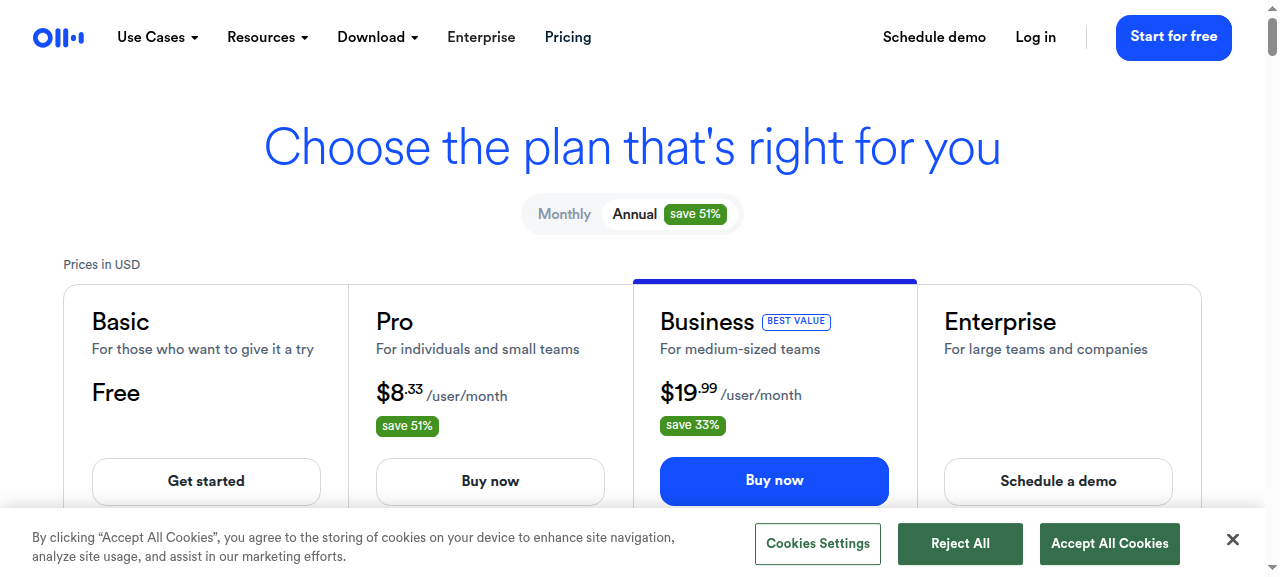
*Pricing verified against each vendor’s plan page on Oct 19, 2026; tiers change often, so re-check before subscribing.*
Prices and AI limits shift often, so check each app’s current plan page before subscribing.
What each app is good at
**Apple Notes** wins on friction. It is already on your iPhone, it opens instantly, and it works with Siri. If you want AI summaries and smart features without installing anything, this is the path of least resistance — provided your device and iOS version support the AI features.
**Notion** is the best pick if you want one place for notes, tasks, and databases with AI layered on top. Its AI can draft, summarize, and translate, and its search across a large workspace is genuinely useful. The tradeoff is that the app is heavier and the best AI features sit behind a paid plan.
**Obsidian** suits people who care about owning their data. Notes are plain markdown files on your device, and you add AI through plugins. That flexibility is powerful but not effortless, and the mobile experience is less polished than Apple Notes.
**Bear** is the choice if you prize a fast, pleasant writing experience with tags and clean export. It is a lovely place to think, but it is not where you go for heavy AI analysis.
**Voice apps** are a different category and deserve their own slot. If your best ideas arrive while walking or driving, a transcriber that converts a two-minute ramble into a structured note is worth more than any typing app. Otter leans toward meetings; Voicenotes and AudioPen lean toward personal capture.
A five-minute way to decide
1. **Only use Apple devices and want no setup?** Use Apple Notes.
2. **Want notes plus tasks and projects, with AI summaries?** Use Notion.
3. **Capture by voice most of the time?** Install a dedicated transcriber.
4. **Care about owning plain-text files?** Use Obsidian.
5. **Want the nicest writing experience?** Use Bear and accept lighter AI.
Running two — one typing app and one voice app — is a sensible default.
Tips for getting real value from AI notes on iPhone
1. **Use the dictation button liberally.** Even in a typing app, speaking is faster than thumb-typing for long thoughts.
2. **Start every note with a clear title.** AI summaries and search both work far better when the note has a recognizable name.
3. **Batch long voice notes into short ones.** A single 90-second note summarizes cleaner than a 20-minute recording with three topics.
4. **Add one or two tags.** Tags give AI organization something to work with.
5. **Review AI summaries before you trust them.** They are aids, not source of truth — especially for anything with numbers or names.
Common mistakes to avoid
– **Choosing a heavy app for simple needs.** If you just want to jot things down, Notion can feel like overkill.
– **Ignoring privacy.** Voice notes and transcripts can be sensitive. Check whether the app stores and processes audio locally or in the cloud.
– **Depending on AI features your device doesn’t support.** Some Apple AI features need recent hardware, so confirm before switching.
– **Hoarding untitled notes.** Unnamed notes are nearly invisible to AI search and to you.
FAQ
What is the best free AI note-taking app for iPhone?
Apple Notes is free and built in, and Notion and Bear both offer free tiers with some AI features. If you need heavy voice transcription, expect to hit free limits and consider a paid plan.
Does Apple Notes have AI?
Apple Notes gains AI features through Apple Intelligence, which requires a supported device and OS version. Features have rolled out gradually, so check what is available for your iPhone.
What is the best AI app for recording and summarizing meetings on iPhone?
Dedicated meeting tools such as Otter and Granola are built for this, with live transcription, speaker labels, and summaries. General note apps can transcribe too, but rarely as thoroughly.
Can AI organize my notes automatically?
Some apps can group, tag, and surface related notes using AI, and Notion’s search is strong across a large workspace. No app is perfect at this yet, so a simple tagging habit still helps.
Are AI note apps safe for private information?
It depends on the app and your settings. Local-first apps like Obsidian keep files on your device; cloud apps process data on their servers. Read the privacy policy before storing anything sensitive.
Bottom line
For iPhone users, Apple Notes is the effortless default, Notion is the best all-rounder, and a dedicated voice tool such as Otter or Voicenotes wins if you capture by talking. Match the app to whether you type or speak, and you’ll rarely switch again.
**Action step:** install one typing app and one voice app, create a single test note in each today, and see which one you actually reach for tomorrow.
Tools mentioned
Disclosure: some links below are affiliate links. If you sign up through them, I may earn a commission at no extra cost to you.
- Notion: link (replace with your affiliate link)
- Otter: link (replace with your affiliate link)
- Voicenotes: link (replace with your affiliate link)